Vibe Code: I Built a Markdown Editor From Scratch With Claude Code (FrankMD) PART 2
If you haven’t read it yet, check out Part 1 to understand the app I built. FrankMD is a Markdown editor that I customized to be effective for my personal use case: writing blog posts. It wasn’t meant to be a replacement for Obsidian or VS Code.
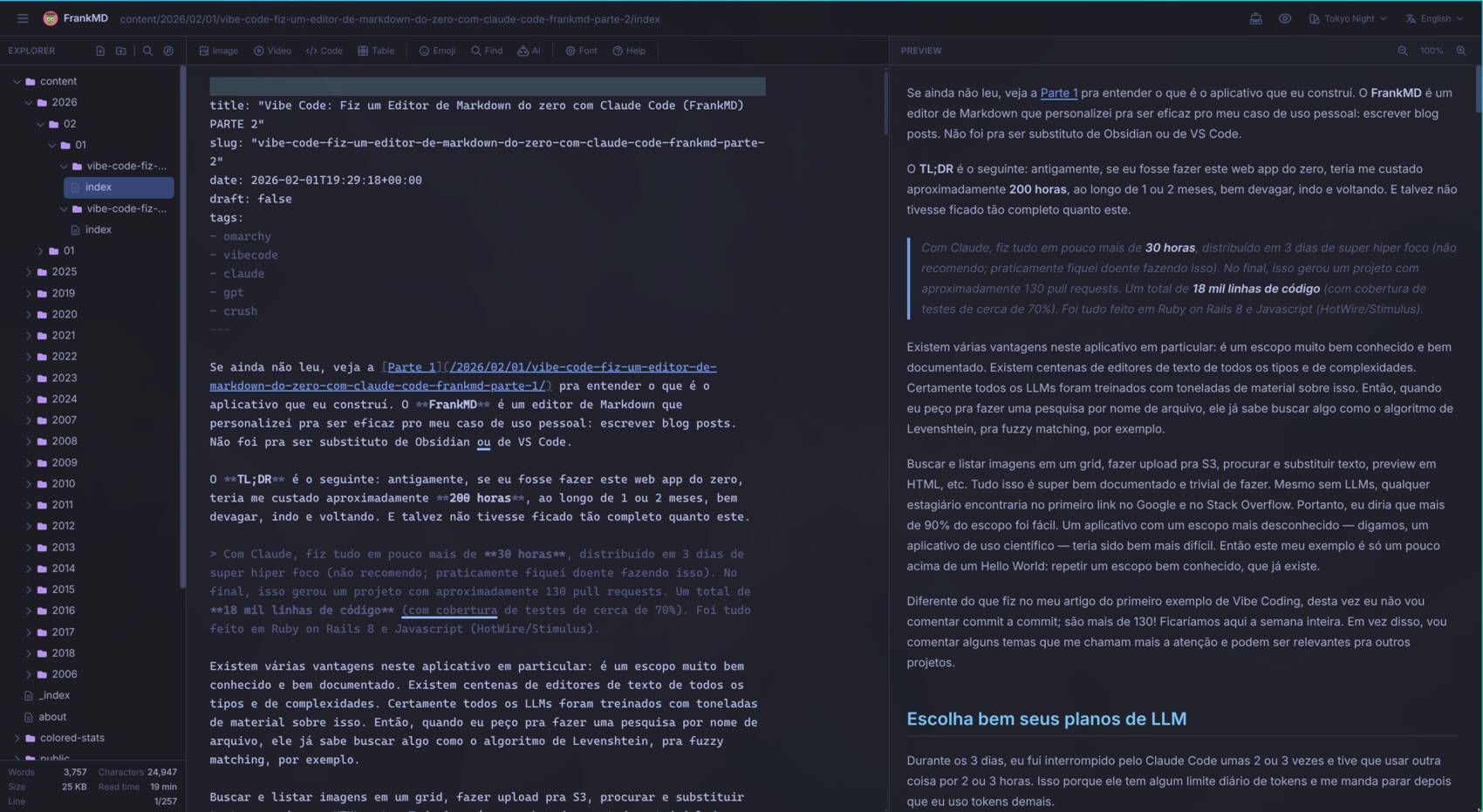
The TL;DR is this: in the old days, if I were to build this web app from scratch, it would have cost me around 200 hours, spread over 1 or 2 months, going slow, back and forth. And it probably wouldn’t have ended up as complete as this one.
With Claude, I did it all in a little over 30 hours, spread across 3 days of super hyper focus (I don’t recommend it; I almost got sick doing it). In the end, this produced a project with roughly 130 pull requests. A total of 18 thousand lines of code (test coverage around 70%). It was all done in Ruby on Rails 8 and JavaScript (HotWire/Stimulus).
There are several advantages to this particular app: it’s a very well-known and well-documented scope. There are hundreds of text editors of all types and complexities. Surely every LLM has been trained with tons of material on this. So when I ask it to search by filename, it already knows to reach for something like the Levenshtein algorithm for fuzzy matching, for example.
Searching and listing images in a grid, uploading to S3, find and replace, HTML preview, etc. All of this is super well documented and trivial to do. Even without LLMs, any intern would find it in the first Google link and on Stack Overflow. So I’d say more than 90% of the scope was easy. An app with a less well-known scope — say, a scientific application — would have been much harder. So this example of mine is only slightly above a Hello World: repeating a well-known scope that already exists.
Unlike what I did in my first Vibe Coding article, this time I won’t comment commit by commit; there are more than 130! We’d be here all week. Instead, I’ll comment on a few themes that catch my attention and that might be relevant to other projects.
Choose Your LLM Plans Carefully
Over those 3 days, I was interrupted by Claude Code about 2 or 3 times and had to use something else for 2 or 3 hours. That’s because it has some daily token limit and tells me to stop after I use too many tokens.
I’m using the Max Plan (5x Pro), which I think costs around USD 100, meaning around USD 6 a day. In this case it was cheap, because 3 days would only cost USD 18.
But during one of those breaks, I switched to using Claude Opus via OpenRouter, and that was WAY more expensive. Outside the Claude Code exclusive Max plan, the per-token cost is absurdly higher. In about 2 or 3 hours, it already burned through more than USD 100 (equivalent to the whole monthly subscription!)
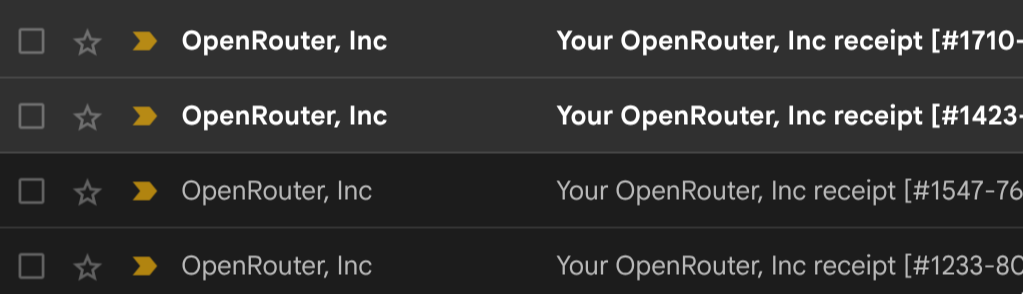
So, in total, by using the Max plan outside its bounds, I ended up spending more than USD 120. But if I had just stopped to rest between the daily limits, I would have spent one extra day (wouldn’t have gotten sick 😅) and wouldn’t have gone much beyond USD 20. So you need to research the plans for each platform carefully before jumping in without thinking, like I did. 😂
As I’ve said over and over: when in doubt, use Claude Code with the Max plan.
Choose Your Architecture Carefully
When I started coding (every time I say “I coded”, read it as “I vibe coded”, of course), the start was very fast. I decided only a few technical things: I wanted it to be Ruby on Rails 8, I wanted it to use Tailwind CSS, I wanted it to use no database and implement everything based on the filesystem, I wanted it to have no authentication, since it would be self-hosted for my use only.
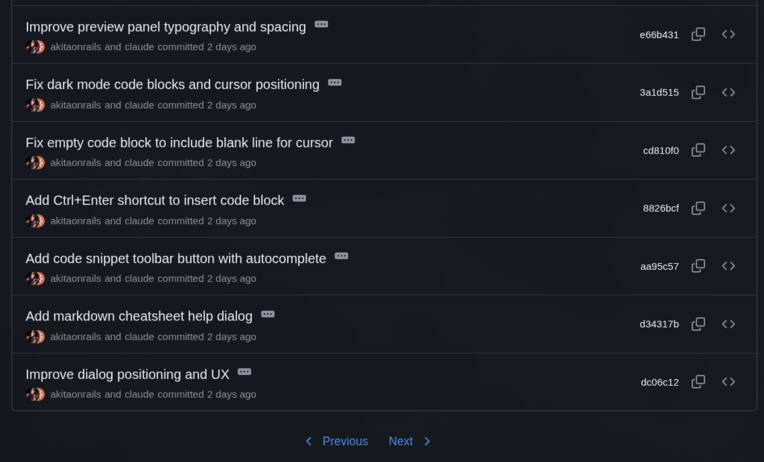
The first 10 commits took a little over an hour and a half. I kept adding features bit by bit to give “shape” to the editor, and at this point I already had a minimal, good-looking editor, with a dark theme, that edited and displayed an HTML preview. Not bad for a prototype.
As I said in the other article, this would be one of the “it already works” milestones.
But of course, there are still more than 120 commits to really work, and nearly 30 hours to reach the “really works” stage.
I kept adding various small features, in this order:
- Add a Markdown cheat-sheet (help)
- Dialog box to add fenced code blocks with language autocomplete
- Theme system, already adding around 10 themes (but not yet tuned for Omarchy)
- Dialog box to customize fonts
- Zoom control on the Preview
- First attempt at “typewriter mode” (this will cause plenty of headaches later)
- Dialog box to search files by path with a fuzzy finder
- First attempt to sync the editor scroll with the preview (this will also cause plenty of headaches)
- Dialog box to search files by content with regex support
- Dialog box to search and embed YouTube videos
- Dialog box to search images, upload and insert
- Initial Docker support
That completes the first 34 commits and about 4 hours of work. Again, very close to “it already works”.
But the fun begins at commit 7bbf03a, titled: “Refactor to Restful Architecture”.
This is a Rails-specific thing, and an architecture thing in general. Claude, without me instructing it, did exactly what I’d expect a Rails intern to do: it crammed all the logic for managing directories and files, image uploads and everything else into 2 or 3 service modules.
It also wrote all the routes manually. That is, it didn’t use the most basic thing in Rails: the concept of Restful Resources. Read the linked guide; I won’t explain what that is here, just that any experienced Rails person knows it with their eyes closed.
So it created routes like “http://localhost:3000/notes” but didn’t enable things like “http://localhost:3000/notes/hello” automatically opening “hello.md”, and HTTP verbs like PATCH to update the file or DELETE to remove the file. And also, without the GET option, I wouldn’t have the option to bookmark a file directly. All of this comes for free if you use RESTful. So that commit was the refactor where I instructed it to redo everything in that architecture. Just that alone was almost 1000 lines added.
The “correct” thing would have been to set up, right at the start, a CLAUDE.MD or CONTRIBUTING.MD file or something similar with the specific architecture rules and code conventions — but I didn’t, so here’s a reminder for you. 😅
Refactoring and Fixes
After that first big refactor, I went back to making adjustments (fixes) and kept adding new features:
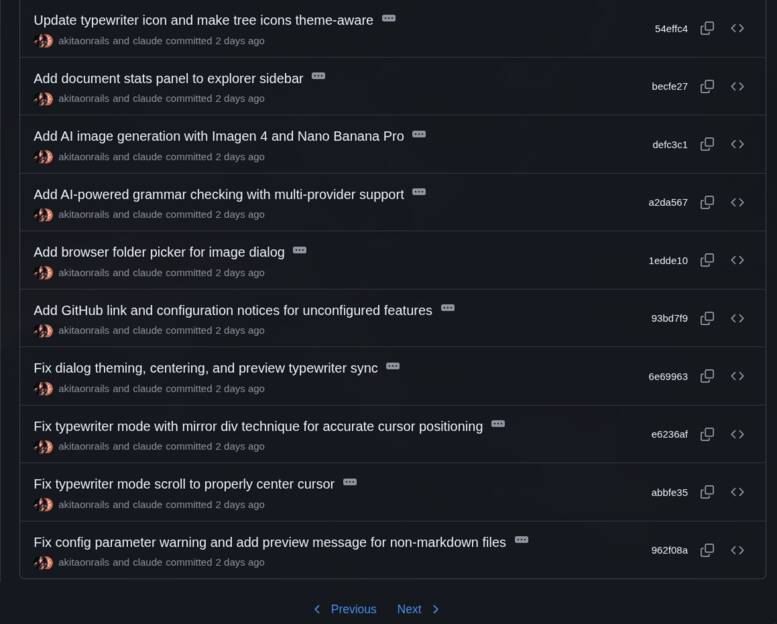
At this point we already crossed 47 commits and more than 8 hours non-stop. And yes, I didn’t take my eyes off the monitor. You can’t read 100% of everything Claude is thinking and doing; it’s a lot, but overall I’ve noticed you need to keep glancing at it and, most importantly, pay very close attention!
The processing time for multiple agents in parallel, many in reasoning/thinking mode, is really slow. Claude is one of the fastest compared to the others, but in practice I find it painfully slow.
After lunch, I decided to open YouTube on the side while waiting for Claude to finish the tasks. That means I wasn’t paying attention and only glanced over to see if it finished with “success” or asked me for some permission to execute something.
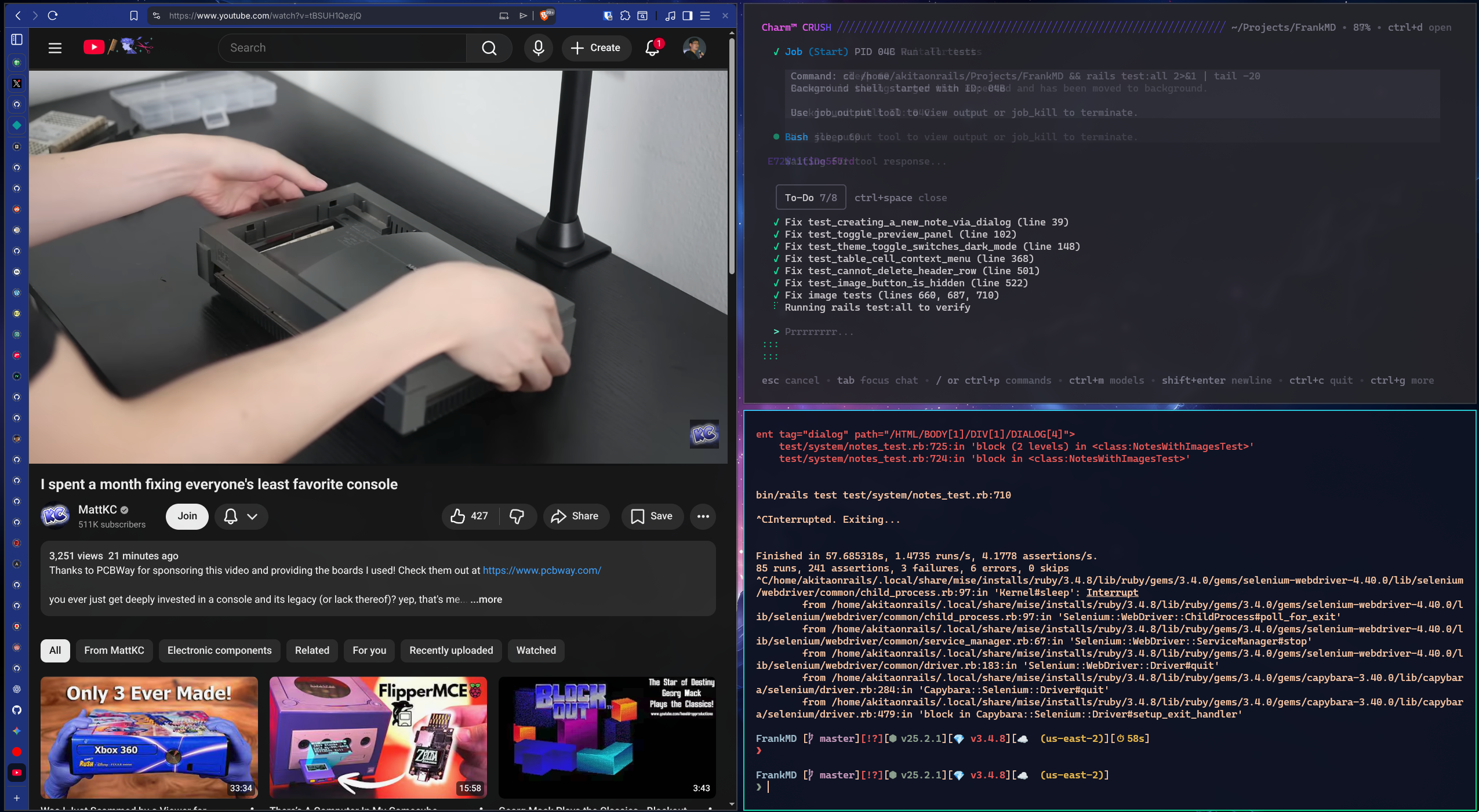
I don’t remember if it was at this point, but I went to look at what it had generated, and of course, by this stage it already had an application.css with more than 1000 lines, which I asked it to fix in this commit, and it broke one huge file into all of these:
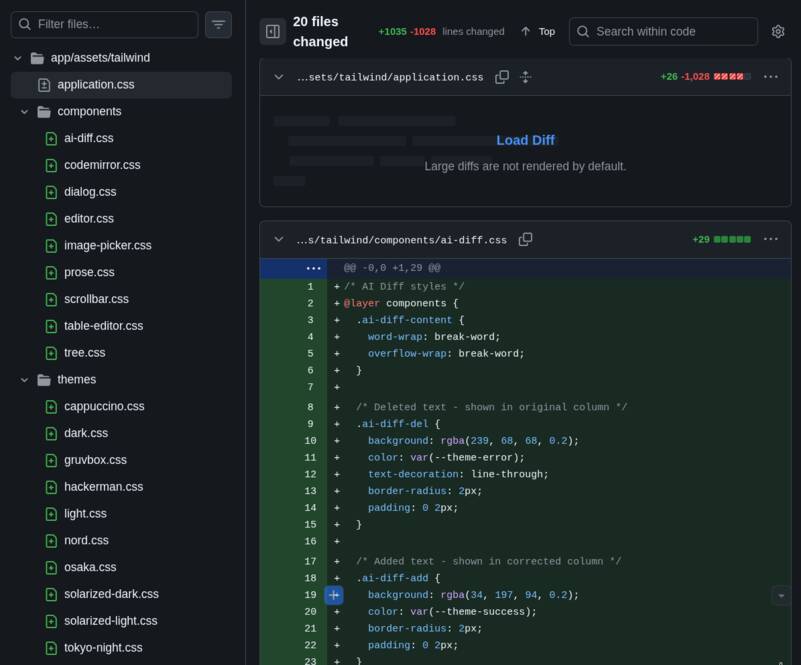
Even the themes: everything was in a single file!! This is the level I’d call “intern”. Since everything “works”, it just keeps piling up code, all in the same place, and leaves worrying about it for later. Every intern does this at the start if nobody teaches them, and apparently the LLM does the same. It won’t proactively do anything you didn’t explicitly ask for. In fact, I never said in the prompt “remember to keep breaking things into small files”, but I should have.
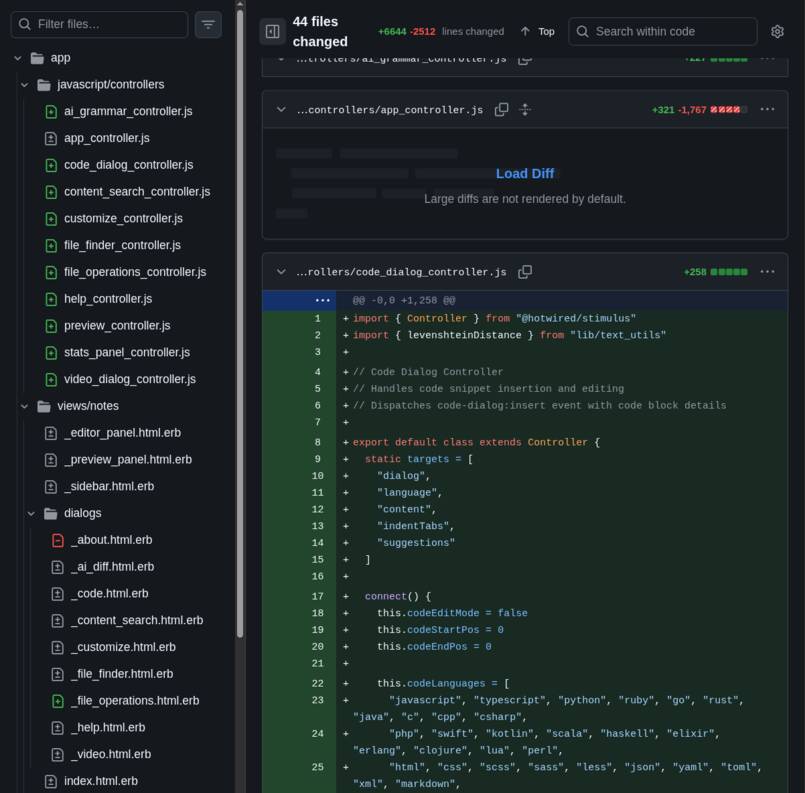
But that wasn’t the worst. No sir, this commit has all the JavaScript in A SINGLE FILE. I think it was already past 4 or 5 thousand lines. Look at how many files it broke it into, it doesn’t even fit in this picture:
The problem is that I myself fell into what I’m criticizing here. I’d ask for a new feature, hit “reload” on the browser and voilà, there was the new feature! “WORKING”!! (Ruby on Rails is very productive!)
And that’s how it went, adding “it already works”, adding, “it already works”, and when I finally looked, horror show!!
At the last refactoring we were at around 9 hours of work. This is where we wrap up the day; we’re on the next day and, not counting the time I slept, we’re already at 17 hours, 70 commits. Roughly HALFWAY through the project.
All this to say the following: the BIGGEST part of Vibe Coding will always be REFACTORING, fixing bugs, and adding TESTS!
I18n - Internationalization
I got a little ahead of myself; before the JavaScript mega-refactoring, I had done another mega-refactoring: I asked it to extract all the English strings and already translate a Brazilian Portuguese option for me. Another gigantic commit with more than 1600 lines modified.
I wanted to make a separate section just to comment on this because this is one of the points where I think LLMs shine. They were originally built precisely to deal with natural language and translations. LLMs are very good with languages. In the old days I’d have to go through Google Translate, which was always pretty bad, and then find a native speaker to adjust the terms Google got wrong.
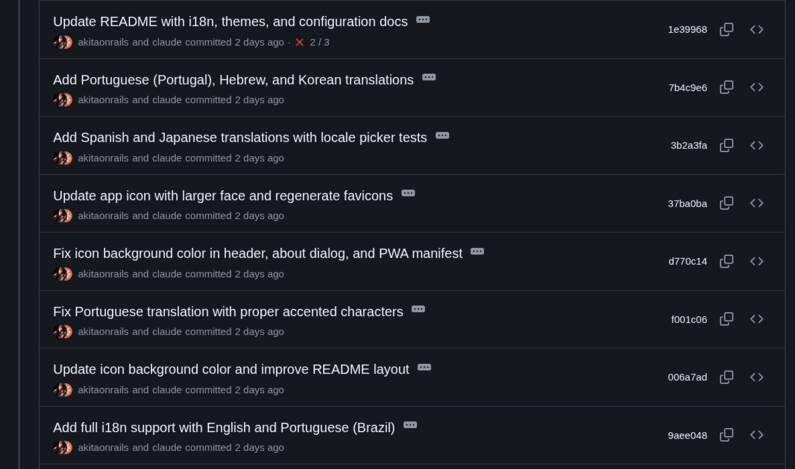
As expected, after extracting everything, asking it to adjust the tests to take i18n into account, and seeing that Portuguese was working, I started adding others just for fun and was very pleased with the result. I18n is definitely something that doesn’t make sense to do without an LLM these days. It’s orders of magnitude better than the old way.
The Last HALF
From the last big refactor to the end, there are about another 70 commits and roughly 14 hours, the end of the second day and the third day, with a roughly 15-hour break in the middle where I got a fever and had to throw myself into bed and stuff myself with medicine… but all good, the next morning I felt a bit better and finished it!
From there on, I kept adding the rest of the features, like emoji, emoticons, find and replace dialog, jump to line dialog, adjustments to the configuration system (via envs, via .fed), and Docker.
One thing I didn’t mention before, but that came before the I18n effort, was a REBRANDING. This is another thing LLMs are very good at solving: text substitution, knowing how to tell apart plain text, variables and code in general. I wasn’t very inspired and, at the start, I was going to make a MUCH simpler little web editor than what it ended up becoming, and I was just going to call it “WebNotes”.
But when it grew and I decided it was worth sharing publicly, I decided to give it a real name. That’s how “FrankMD” was born. But it’s not enough to just give it a name; now you have to go rename EVERYTHING inside the code, strings, documentation, etc. It was in this commit: a solid 700 lines of modifications.
Now “does it work??”
I’m writing this article at 5 PM on Sunday. At 7:25 PM on Saturday, I sent it to some friends on Discord to test, innocently thinking I’d already reached version 1.0.
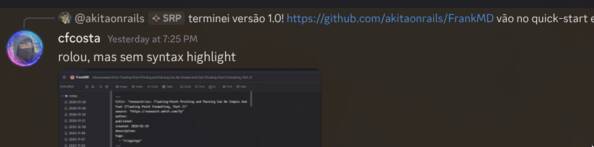

And there I went, with a fever and needing to lie down, but wanting to reach 1.0!!
The issues themselves I killed quickly, but Syntax Highlight I didn’t know was going to become hell in my life. The first version came out quickly, in this commit
Don’t Reinvent the Wheel (duh)
Yes, it’s the most obvious cliché of all, but even I make this mistake. As I said at the start, my expectation for this project was to be little more than a Web “Notepad” for my notes, and it ended up becoming the main editor for my blog.
The text editor part started with the first thing that works first: just a plain textarea.
But on Saturday I wanted to add a line counter column that takes line wrapping into account, control over that wrapping, typewriter mode always centered in the middle of the screen, and sync between the text editor scroll and the preview.
Not counting all the dialog boxes that add things to the text, like images, videos, code and tables. Not counting the shortcuts for things like bold, italic. Not counting auto-save routines, line count stats, current line, etc.
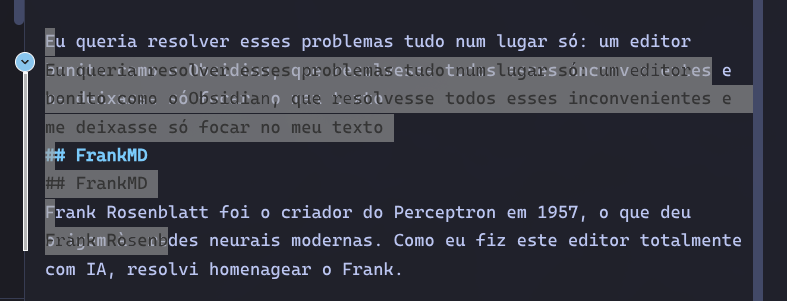
For those who don’t know, the problem with syntax highlight is that you can’t edit directly on the colored text (because it has hidden tags that format the text). One way to solve this is to duplicate the text block: one in the background, which is the raw text and you can edit however you want, and another formatted and colored block with HTML exactly on top, which you don’t touch, but it updates with whatever is edited. That’s how Claude did it.
But there are a LOT of “edge cases”: alignment problems due to wrapping, problems with size and position to adjust the auto-scroll sync. I spent hours and hours fighting with this. Look at the kind of problem I was dealing with:
Everything got resolved when I decided: enough. I’m reinventing the wheel. Obviously this problem has already been solved. So I asked Claude to remove all the logic tied to the custom textarea and replace it with Code Mirror, which is an open source component for a code editor, with support for line counting, syntax highlight, and much more!
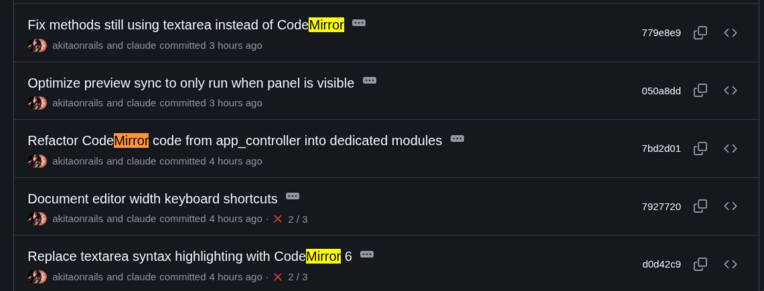
It wasn’t just those 5 commits; those were the main ones. They took a solid 3 hours or more to stabilize that code, plus multiple small adjustments over more commits. A good 6,000 lines of code modified. It’s the kind of refactoring that, in a real project, would have taken the whole week and still would have come out with multiple bugs and side effects. But for this, the LLM is also very good. Big refactorings, especially if you’ve prepared a good automated test suite, go quite well with LLMs.
This is the kind of thing that happens in real projects. I can’t blame the LLM, it’s entirely my fault for changing the project requirements: originally there wasn’t going to be syntax highlight!
Tests, tests, tests
The main recommendations for how to do vibe coding are the same as how to program the old way:
- Be careful with architecture choices (yes, it takes experience)
- Build small features one at a time, each with the right abstractions and immediately with tests
- Refactor from time to time to consolidate or abstract code into the right domains, adjusting and adding more tests
If you follow those 3 items, it already helps a lot. It’s not magic: all of these are tools that give feedback to the LLM so it knows what to do.
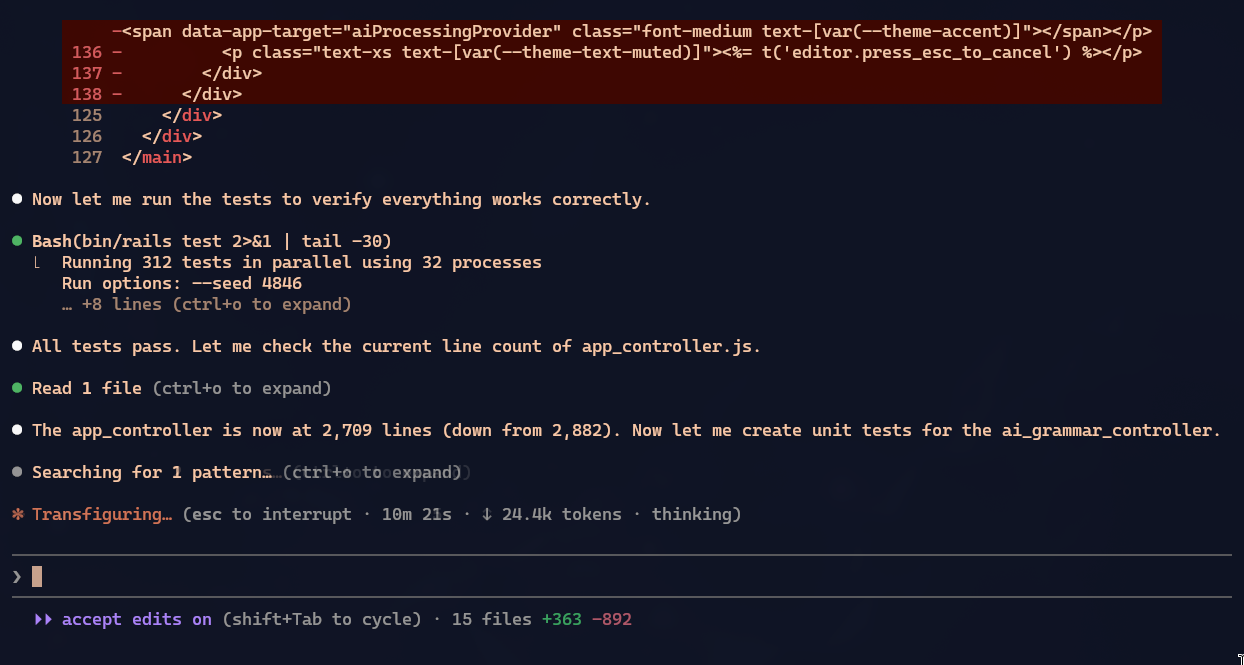
If you’re the kind of dumb customer who only says “oh, it stopped working” — you’re no good at talking to a programmer, and I’m sorry to say that LLMs won’t help you either:
- WHAT stopped working?
- Did everything stop opening?
- Did just one element disappear?
- Does the element appear but clicking does nothing?
- Can you click, but an error message appears?
- What message exactly?
- What did you do before that?
- Did you change anything from the previous test to this one?
- etc
ALL OF THIS and more has to be in the next prompt for fixes. Including server logs, command lines to reproduce the error, and whatever evidence can be produced, to make it easier to understand the error.
There’s no such thing as “it stopped working” — your head is the thing that never worked.
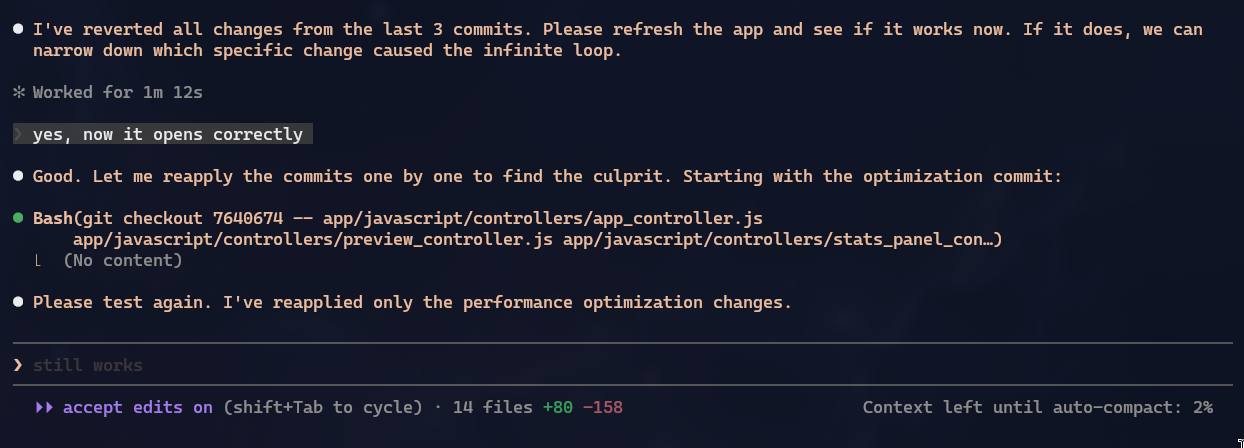
One thing I really liked about Claude was when a bug appeared that hadn’t existed before, but I didn’t know if it was from the last commit or from 3 commits back. And instead of just guessing at random things, Claude itself offered to manually do the equivalent of a git bisect and kept offering me one commit at a time to test and keep going until we found which one introduced the bug:
Optimizations and Checks
Throughout the project, 2 or 3 times I specifically stopped to check things like memory leaks and security holes. Even being a personal project, I didn’t want very obvious holes.
Be warned that Claude is a champion at scattering setTimeout calls in JavaScript and never calling clearTimeout on anything!
It’s not much, but I had more than one commit to delete “Dead Code”: code that, during a refactor, was moved to another module but forgotten at the origin. LLMs will always leave dead code behind, because they have no way to look at 100% of every file 100% of the time. Eventually it misses one thing or another. And it won’t cause any obvious bug. You have to prune it gradually, after each refactoring.
When I started really testing with long texts, I noticed the interface had “lag”, kind of slow. Two things seemed to be causing it: the statistical count of how many words and characters the text has was very aggressive.
Again, “it already works” … but slow …
Worse: when I first asked it to create the text editor, I didn’t say exactly how I wanted the “auto-save” to behave. So it did it in the most conservative, aggressive and slow way of all: save everything on every keystroke!!!
There were several other things like not updating the HTML Preview if it wasn’t open and things like that.
LLMs won’t make performant code right off the bat; you need to tell them how!
Performance is always a trade-off. For example, if I go as fast as possible, the rest may end up super insecure. If I crank up security too much, usability collapses. If I over-optimize, maintainability collapses. There’s no way to make everything perfect: one will always negatively affect the other, and only an experienced programmer knows how to choose (or goes through trial and error until getting it right for the specific case).
Again, it’s not the LLM’s “fault”; this is normal in any project and we have to keep adjusting these things all the time.
Now really, reaching the end
There’s still plenty of technical debt left. The app_controller.js file still has more than 2,000 lines. And this is AFTER I spent a solid 3 hours refactoring just this one. Now there are roughly 28 JavaScript controllers, but before there was only a single file.

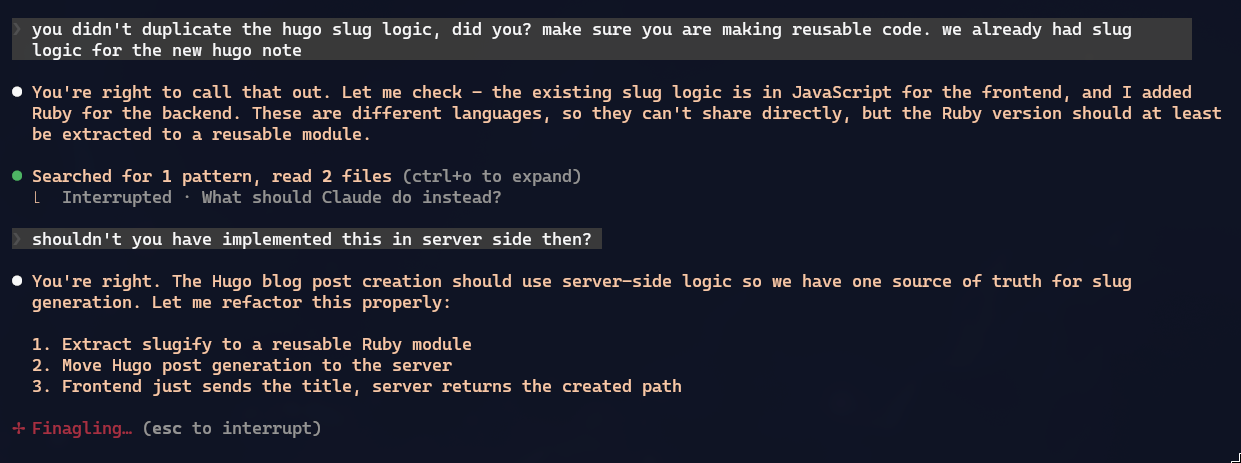
Besides that, LLMs can’t be consistent all the time, especially when the project code grows a lot. There was one type of feature it always did server-side, but later decided to do client-side. I had to interrupt and say: “hey, why?”, and then it redid it the right way:
Any code written with zero human assistance ALWAYS comes out at the worst possible code quality. With my assistance, I think the code is at least minimally presentable. You can check for yourselves at my GitHub repository.
I recommend digging through the commits: at least one thing LLMs do well is document the history of what was modified in each commit, which makes it much easier to search later.
There was one bug where Claude got stuck in a loop, trying and failing, to figure out when my CSS broke out of nowhere. It changed something and asked me to test; I restarted the server, did a force reload, and nothing: broken.
It was Saturday night; I was tired and a bit feverish, but then the penny dropped. I had done something dumb earlier. I put “notes/” in the .gitignore, which was the directory where I was creating test Markdown files in the editor and didn’t want to commit.
However, that also started ignoring directories like app/views/notes/..., for example. And neither I nor Claude knew this, but when I asked it to search, voilà:
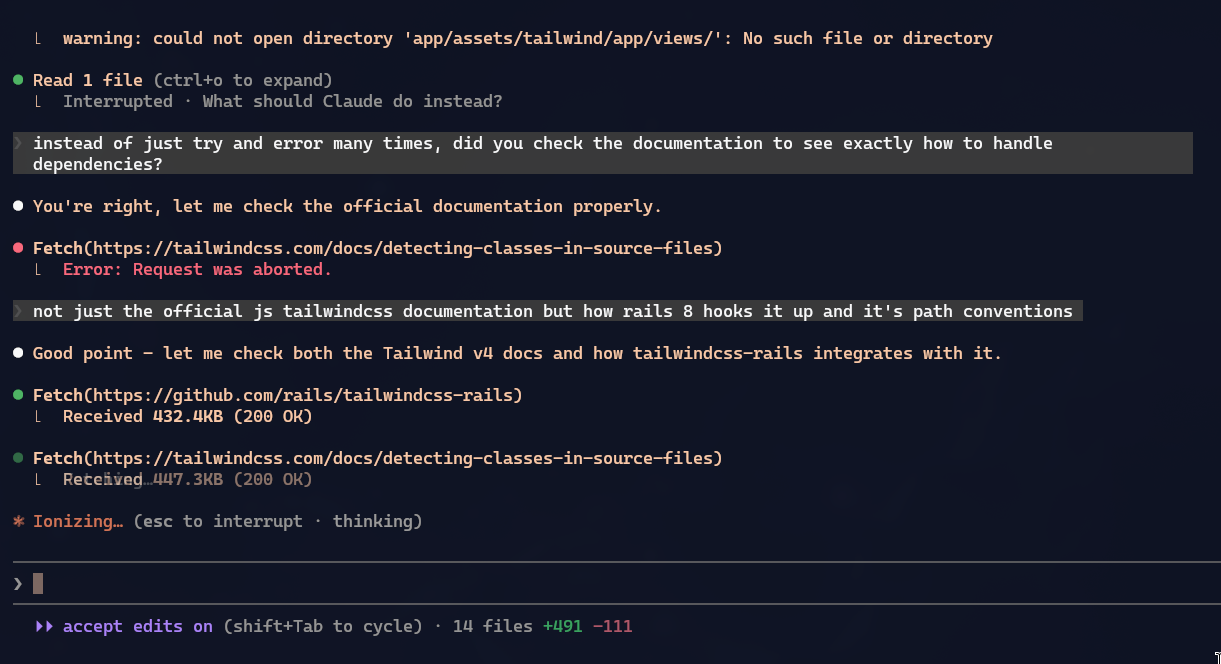
Tailwind build obeys
.gitignore, so it was screwing up the CSS compilation. 🤬
When we fixed that, it started working, but by then 2 hours had gone by!
As I said, you have to stay sharp on the errors, watch why the LLM is doing so much trial and error, doing and undoing in the same place and getting nowhere. This isn’t uncommon and can eat up half your day if you’re not paying attention.
Conclusion
When I started this Friday morning, I imagined:
“Ah, a full day of work should be enough.”
And as always, every estimate is an underestimate. It’s already Sunday, end of the day, and only now do I think I’ve gotten close to version 1.0. It still isn’t perfect, but I think it’s at least minimally presentable.
Remember I did this at my pace of extreme hyperfocus, when I barely blink, my eyes dry out and I start to see everything blurry, and even my head starts to hurt a bit from staying so tense, concentrated on a single thing. It’s not a state I recommend.
Even those 30 hours over 3 days, the right thing would be 30 hours spread over at least 5 days.
If I had let Claude do everything on its own, without checking anything, it would have taken half the time and, in the end, I’d have code “that works”, but bizarre, with a single CSS file of around 2000 lines, a single JS file of around 8 thousand lines, everything with ZERO tests, and everything looking like a house of cards where you touch one small thing and break 10 other things without knowing why.
Overall, it was a good experiment. Knowing how and where to use them, LLMs are exceptional. As I said at the start, without the LLM I would have taken more than 200 hours to do it alone. Even going through several rough patches along the way, I only took 30 hours. So the LLM really did make me work at least 6 to 7 times faster, maybe more.
Finally I feel we’ve reached the elusive “10x Developer”. All you need is to be a senior first.
To wrap up, a mini-report from Tokei:
Breakdown by language:
┌─────────────────┬───────┬────────┬────────┐
│    Language     │ Files │ Lines  │  Code  │
├─────────────────┼───────┼────────┼────────┤
│ JavaScript      │ 137   │ 26,621 │ 19,922 │
├─────────────────┼───────┼────────┼────────┤
│ Ruby            │ 60    │ 8,449  │ 5,883  │
├─────────────────┼───────┼────────┼────────┤
│ YAML            │ 10    │ 3,477  │ 2,867  │
├─────────────────┼───────┼────────┼────────┤
│ Ruby HTML (ERB) │ 33    │ 2,927  │ 2,634  │
├─────────────────┼───────┼────────┼────────┤
│ CSS             │ 29    │ 1,619  │ 1,297  │
├─────────────────┼───────┼────────┼────────┤
│ Markdown        │ 1     │ 716    │ -      │
├─────────────────┼───────┼────────┼────────┤
│ HTML            │ 5     │ 369    │ 329    │
├─────────────────┼───────┼────────┼────────┤
│ Dockerfile      │ 1     │ 88     │ 46     │
├─────────────────┼───────┼────────┼────────┤
│ Other           │ 6     │ 145    │ 76     │
└─────────────────┴───────┴────────┴────────┘
The codebase is primarily JavaScript (60%) and Ruby (17%) by code volume.
So, roughly 33 thousand lines of code. This is a SMALL project! Big projects are 10 times bigger, with more than 300 thousand lines of code. I’d guess that at an iFood or Mercado Livre, with all the subsystems, it’s more than 1 million lines of code. Adjust your expectations!