Vibe Code: I Built a Smart Image Indexer with AI in 2 Days | Frank Sherlock
Over the last 48 hours, I built a complete desktop application from scratch, with published binaries for Linux, macOS, and Windows. 50 commits, ~26 hours of effective work, 8,359 lines of Rust, 5,842 of TypeScript, 338 automated tests. If you told me this 2 years ago, I would have called it a lie.

The name is Frank Sherlock — a local image cataloging and search system using AI. You point it at a folder (it can be a NAS with terabytes), it scans everything, classifies each file using a vision LLM running locally on your GPU, and gives you full-text search over the content. It’s not cloud, nothing is sent out, it runs 100% on your machine.
Here are some examples of text it extracted from some of my images:
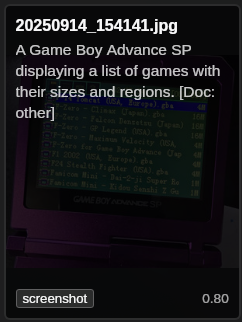
And check out the Surya OCR details: it read the text on the Game Boy screen perfectly:
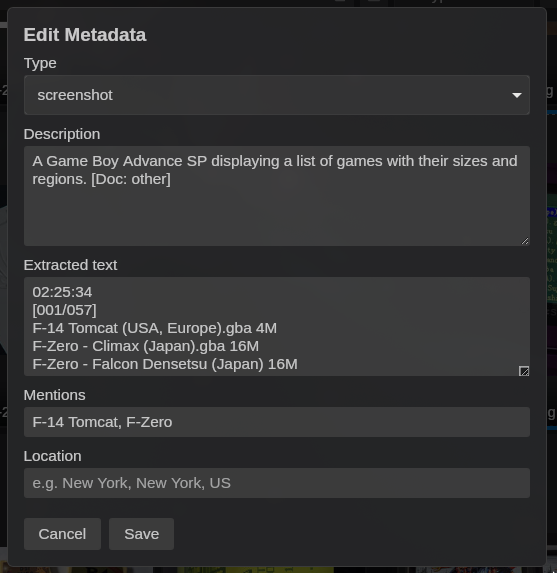
More than that, I have directories of screenshots of payment receipts. I would never find anything in there again, but now:

It does make some mistakes, of course, with obscure anime (it keeps thinking everything it doesn’t recognize is Evangelion 😂). But it surprisingly gets many of them right too. And the descriptions themselves already help a lot.
You’ll need a minimum GPU (I only tested on my 5090, but there are smaller models to download for smaller GPUs, and it theoretically supports AMD and Mac too, but I haven’t tested yet - I’ll accept Issues and Pull Requests from anyone who wants to do beta-testing on Mac and Windows). You just need Ollama installed and running; optionally, Python (to have Surya OCR, which is optional, but is the best).
I’ll mark it as “1.0” when I have more people testing on Windows/macOS and I have the certificates to sign the executables properly. This is still a “beta” version! Compile and run it yourselves on your machines, everything is explained in the README.
And I did this with my “Agile Vibe Coding” — basically, programming in partnership with an LLM (in this case, Claude Code).
Agile Vibe Coding works. And it works very well. But the idea is only 10% of the work. The other 90% is engineering.
Engineering requires experience, judgment, and knowing how to ask the right questions. The LLM is an excellent executor. But whoever decides what to execute, in what order, and why, that’s still the developer’s job.
There’s a growing discourse that anyone with a good idea can build software now. In a certain sense, yes, you can get a prototype up fast. But the distance between “runs on my machine” and “software that works on 3 operating systems, survives cancellations in the middle of processing, doesn’t corrupt data, and scales from 94 test files to 500,000 in production” is still enormous. That gap is engineering, and engineering still demands someone who knows what they’re doing.
I’ll tell the complete story: from initial research to release, going through benchmarks, proof of concept, architecture decisions, multi-platform CI/CD, and everything that sat between “I have an idea” and “here’s the AppImage, the DMG, and the MSI”.
The Original Idea
It all started with a simple question: can open-source vision LLMs actually classify content? I’m not talking about “woman on the beach” — any model does that. I’m talking about looking at an image and saying “this is Ranma, from the anime Ranma 1/2 by Rumiko Takahashi, in a scene from the OVA The Battle for Miss Beachside”. Are we at that level yet? (TL;DR no, but enough)
And if we are, can you build a smart file catalog? Something where I point at my NAS with terabytes of media accumulated over decades and can search by content, not by filename? Anyone with a home NAS knows: after a few years, files pile up and directory organization simply stops scaling. You know you have that 2019 payment receipt somewhere, but the file is called IMG_20190315_142301.jpg and it’s in a directory with 3,000 other photos.
My hardware: AMD 7850X3D, RTX 5090, Arch Linux. Absolute restriction: no remote APIs, no OpenAI, no cloud. Everything open-source, everything local. If I’m going to process terabytes of personal files, including financial documents and private photos, I don’t want to send anything to third-party servers. Plus the cloud API cost for that volume would be prohibitive.
But first: research. Without knowing if the technology delivers what I need, there’s no point building anything. Small scripts, quick prototypes, different models. See what works before writing the first line of code of the real app. This is a pattern I’ve followed for years: validate the riskiest assumption first. If the vision LLM can’t classify decently, everything else is a waste.
A/B Research: Benchmark Driven Development
This is the part most people skip, and it’s exactly where experience makes the difference. The temptation to jump straight into implementation is enormous. “I’ll use model X because I read on a blog that it’s good.” No. Before choosing model, framework, or architecture, I set up a formal benchmark.
I built a test corpus with 94 files: 60 images (photos, screenshots, anime, documents, receipts), 9 audios, 13 videos, and 12 documents. For each file, I created a ground truth in JSON with the correct classification — type, description, series (when applicable). That ground truth is what lets you measure real accuracy, not “I looked at the result and it seemed OK”.
The benchmark has 6 phases, each answering a specific question:
- Metadata: how much does it cost to extract basic metadata? (answer: cheap, 0.07s/file)
- Images: which vision model is best? Which OCR?
- Audio: does Whisper work? Which model size?
- Video: does frame-based classification work?
- Unified catalog: does the full integrated pipeline work?
- Cost projection: how much time and money to process a real NAS?
Phase 2: Vision — The Result Nobody Expected
I tested qwen2.5vl:7b, llava:13b, and minicpm-v:8b on 30 labeled images. The result:
| Model | Type Accuracy | Series Accuracy | JSON Valid | Latency/img |
|---|---|---|---|---|
| qwen2.5vl:7b | 0.80 | 0.14 | 0.87 | 0.55s |
| minicpm-v:8b | 0.50 | 0.00 | 0.83 | 1.63s |
| llava:13b | 0.33 | 0.06 | 0.83 | 1.62s |
The 7B parameter model crushed the larger ones. It’s not a typo. qwen2.5vl:7b beat llava:13b (almost twice its size) in every metric, and was also 3x faster. This contradicts the intuition of “bigger model = better model”. In practice, it depends on the task and the prompt.
Naturally, the next question is: what about the 32B? Same model, giant version. We should be able to get much more, right? Wrong:
| Model | Type Accuracy | Series Accuracy | Latency/img |
|---|---|---|---|
| qwen2.5vl:7b | 0.87 | 0.19 | 0.77s |
| qwen2.5vl:32b | 0.87 | 0.25 | 22.46s |
The 32B gave +0.06 in series accuracy (literally 1 more hit out of 16 labeled items) and cost 29x more time. For someone who’s going to process hundreds of thousands of files, this trade doesn’t close. 29x slower means a 6-hour job turns into a week-long job.
Here I’ll make a comment about tooling: I did the first round with Claude Code and had asked it to pick the models it thought were best. But then I decided to go to GPT Codex and it made other suggestions I found interesting to test. In summary: I’ve been finding Codex much better for experimentation and exploratory code, for actual research. I find Claude better when we already know exactly what we want.
With Codex, I tested the new candidates qwen3-vl:8b and qwen3-vl:30b-a3b with 3 repetitions for statistical significance. The result? Both worse than qwen2.5vl:7b — type_accuracy of 0.55 versus 0.89 for the incumbent, with a 95% confidence interval that doesn’t even come close. And even slower: 2x and 2.2x respectively. A newer model isn’t always a better model for your use case. qwen3-vl frequently returned truncated or malformed JSON — a real regression in robustness.
OCR: Surya vs Ollama Vision
For text extraction (scanned documents, receipts, screenshots with text), I tested two engines:
| Engine | Coverage | Similarity | Latency/img |
|---|---|---|---|
| Surya | 54/65 files | 0.9455 | 8.15s |
| Ollama Vision | 38/65 files | 0.9419 | 1.73s |
Surya finds text in many more files (83% vs 58%), but is 5x slower. When it finds text, the quality is practically the same (similarity > 0.94 on both). Obvious solution: hybrid approach. Use Surya when you need maximum coverage, Ollama Vision as fast fallback. The pipeline design became: try Surya → if it fails or doesn’t find text → fallback to Ollama Vision. That’s why I said at the beginning that Surya is optional, if you don’t want to install it.
Cost Projection
Phase 6 did something I rarely see in open-source projects: cost projection for real usage. With the timings measured per file type, we extrapolated to NAS scenarios:
| Scenario | Files | Time | Electric Cost |
|---|---|---|---|
| Test corpus | 94 | 24 min | $0.02 |
| Small NAS | ~5K | 6.6 h | $0.36 |
| Medium NAS | ~50K | 2.6 days | $3.37 |
| Large NAS | ~500K | 26 days | $33.70 |
Take these numbers with some skepticism because it’s back-of-napkin math. $34 in electricity to classify 500,000 files with a local GPU. Try doing that with the GPT-4 Vision API — at $0.01 per image (conservative), that’s $5,000. The price of my setup (GPU + electricity) pays for itself on the first big use.
The lesson: benchmark, don’t guess. I could have assumed the bigger model would be better, or that the newer one would beat the older. The data showed the opposite. ~2 hours of benchmarks saved me from wrong choices that would cost days of rework (in the old days I would have said “weeks”).
Proof of Concept in Python
With the benchmarks in hand, the next step was to validate the complete pipeline before moving to Rust. Not the benchmark pipeline (which tests each model in isolation), but the real classification pipeline — the exact sequence of calls that the final app will make for each file.
I created a Python prototype — 754 lines in a single file (classification/run_classification.py) — implementing the winning strategy from the benchmarks.
The pipeline has 4 enrichment stages:
- Primary classification: sends the image to
qwen2.5vl:7bwith a structured prompt, asks for JSON with type, description, tags, confidence - Anime enrichment: if the primary type is anime/manga/cartoon, does a second pass with a specialized prompt asking for series, character, scene, artist
- Document/OCR: if it’s a document or receipt, extracts text with Surya and/or Ollama Vision, then asks for structured data (dates, values, transaction IDs)
- Output: writes the result in YAML mirroring the directory structure of the source
The most critical part is parsing the LLM’s JSON. Anyone who has worked with LLM output knows they’re… creative with formatting. Sometimes it comes with markdown fences (json ... ). Sometimes there’s text before and after the JSON. Sometimes the JSON is almost right but missing a closing brace. The prototype implemented a 3-attempt cascade that later became the rule for the whole project:
- Direct parse:
json.loads(response)— works in ~70% of cases - Brace-balancing extraction: finds the first
{, counts opened and closed braces, extracts the substring — catches another ~20% - Regex field salvage: if all else fails, uses regex to extract individual fields (“type”: “…”, “description”: “…”) — saves the last ~10%
This cascade stayed in the Rust code practically identical. A well-done PoC shortens the path to production.
Result: 60 images processed, zero errors, 6.29s/image average. The pipeline worked end to end. Time to build the real app.
Building the Tauri App
At this point, I tried to continue with Codex, but then it choked on trying to convert the Python PoC to Tauri. But since the choices had already been made, I went back to Claude Code, and it had no problems mapping from Python to Rust.
Here’s where vibe coding shows what it can do. I’ll tell the real timeline, commit by commit, so you get a sense of the rhythm. The timestamps are from git log, so they’re accurate.
Saturday 02/21 (19:29 → 21:08) — 6 commits, 1h39
It all started with research. Six commits of setup, benchmark scripts, results analysis:
f57221c 19:29 Phase 0: Project setup with uv, environment verification
4977497 19:45 Implement all phases: metadata, image/audio/video classification
af6e3aa 19:49 Add research results report
41d6c2a 20:12 Add per-file timing, OCR phase, cost estimation
0cd1b10 21:02 Fix Surya OCR, re-run on 94-file corpus
25b3ace 21:08 Add conclusions, cost analysis, recommended pipeline
Saturday night, pure research only. Not a single line of app code. But when I went to bed, I knew which model to use, which OCR approach, and how much it would cost in time and electricity.
Sunday 02/22 (13:05 → 23:30) — 14 commits, ~10h25
Sunday was the day of heavy construction. I woke up, had lunch, and sat down to work.
13:05 — First commit of the day: the Python classification prototype. 749 lines validating the complete classification pipeline, the JSON parsing cascade, and the conditional enrichment. This prototype wasn’t throwaway — it was the executable design document for the Rust pipeline that would come later.
I took a break to go out, take a walk, have a glass of wine, then came back and continued:
17:31 — Benchmarks updated with the new candidates (qwen3-vl:8b and qwen3-vl:30b-a3b). Three repetitions each, confidence intervals. They confirmed that qwen2.5vl:7b was the right choice — not by a little, but by a huge margin.
17:56 — The “big bang”: Tauri app scaffold. 9,631 lines inserted in a single commit. The entire app structure: Rust backend with SQLite + FTS5, React frontend, config system, file scanner, data models, query parser for natural search. At that point the app was already searching the database. It didn’t have classification yet, but the foundation was solid — and that’s exactly the point. The scaffold came with tests, TypeScript types, and the directory architecture I defined. Claude generated the code, but the module structure (config, db, scan, models, query_parser) came from how I wanted to organize responsibilities.
19:04 — The heaviest commit of the project: 4,186 lines. Classification pipeline in Rust (1,069 lines of classify.rs — practically the translation of the Python PoC), thumbnail generation (Lanczos3, 300px, JPEG 80%), incremental scanning with fingerprint, the Surya OCR Python script, runtime detection for Ollama, and the brutal expansion of the database with upsert, touch, delete, and FTS indexing. In one commit. With 47 tests. I had to make the architecture decisions (how the cache mirrors the rel_path, how the scan is divided into two phases, how errors propagate), but Claude wrote most of the code and the tests that came with it.
19:55 — UI redesign, scan cancellation, auto-cleanup of orphan classifications, reorganization of the whole repo (moved everything from research to _research_ab_test/). CI and release workflow already configured in this commit — I knew I was going to need them the next day.
21:02 — DB resilience (WAL mode, backup, health check), root management (add, remove, list monitored directories), zoom, sidebar redesign with tree view, thumbnail fix. Four features in one commit. In a manual workflow, each one of these would be a separate PR with days of review.
21:14 → 21:39 — Read-only database mode for sandbox filesystems, resume of interrupted scans on startup, grid tiles redesign with hover overlay, selection model, infinite scroll. Three commits in 25 minutes. Claude was on an absurd pace.
22:41 — Multi-select with Ctrl/Shift click, collage preview with selected items, Ctrl+C copies to the OS clipboard.
23:30 — The big refactor: monolithic frontend (everything in App.tsx - if you don’t explain, Claude always does this) broken into 15 components + 10 hooks + 84 frontend tests. This is the kind of thing that normally takes a full day of tedious work. With vibe coding, it was a one-hour commit. Claude extracted each component, created the hooks, set up the tests with proper mocks, and kept everything working. I just had to say “refactor this monolith into components and hooks, and write tests for each one”.
Monday 02/23 (00:09 → 14:33) — 30 commits, ~14h
Monday was polish, robustness, and the cross-platform marathon.
00:09 — Multi-OS abstraction: all platform-specific code isolated in the platform/ module. This decision, taken early, saved hours of pain in CI. When Windows needed special treatment for UNC paths, the change stayed contained in platform/process.rs instead of spread across 8 files.
00:12 → 01:18 — Quick sequence: cargo audit in CI, duplicate removal, GPL-3.0 license, help dialog (F1) with query syntax examples, sort controls for results, formal SQLite migration system, context menu (copy, delete, rename). Six commits in just over an hour.
09:38 — After sleeping about 8 hours, the first commit of the morning: extraction of the LLM module. The monolith of Ollama calls that lived inside classify.rs was separated into llm/client.rs (HTTP calls, JSON parsing), llm/management.rs (download, listing, cleanup of models), and llm/model_selection.rs (hardware-aware selection by tier). Atomic file ops so cache doesn’t get corrupted if the process dies in the middle of a write.
10:54 — EXIF location extraction (GPS coordinates → readable address), metadata editing modal, setup instructions per OS (each OS has different dependencies for Ollama and Python).
11:34 — PDF support: scanning, indexing, and preview using PDFium. Not trivial — PDFium needs a native binary per platform, page rendering to image, blank page detection (so you don’t generate a thumbnail of an empty cover), thumbnail assembly with the first 2 pages that have content, and native text extraction as a faster alternative to OCR.
12:08 — Albums and Smart Folders. Albums are manual collections (the user drags files in), Smart Folders are saved queries that appear in the sidebar and update automatically. Two database migrations, new sidebar component, drag-and-drop. In 34 minutes.
12:11 → 12:52 — macOS-inspired SVG icons in the sidebar, CLI argument support (sherlock /path/to/folder), copy description/OCR text in the context menu, PDFium path fix in production, icons and screenshots in the README, tauri script in npm, sidebar toggle, dynamic titlebar, Windows compilation fix (Unix-only imports). Ten commits in 41 minutes. Most of these were issues that showed up in CI or during manual testing.
13:14 → 13:54 — The CI fixes marathon. Auto-provision of the Surya OCR venv with progress bar in the SetupModal, icon regeneration with alpha channel, cargo fmt + clippy + UNC paths fix on Windows, tests for help dialog examples, individual folder rescan, Windows assertions fix, release workflow permissions fix. Seven hardening commits. Each one resolving a real bug that appeared in the CI matrix or in testing.
14:26 — Drag-and-drop to reorder roots in the sidebar, scan cancellation before deleting a root (so you don’t leave the scan running in the background on a directory the user removed — a subtle edge case that could cause a crash).
14:33 — Last commit: responsiveness fix in scan cancellation. Check the cancel flag after each classification, immediate poll instead of waiting for the next tick. Small detail, big impact on UX.
Architecture Decisions
Here’s what separates “letting the LLM write code” from “building real software”. None of these decisions came from a prompt. Claude didn’t suggest any of them spontaneously. I had to ask for each one.
Read-Only Principle
The app never writes to the scanned directories. Everything — thumbnails, classification cache, database — sits in ~/.local/share/frank_sherlock/. This is more than good practice, it’s respect for the user’s data. If someone points at the company NAS, the app can’t go around creating .sherlock/ in every subdirectory. If the directory is mounted as read-only via NFS, the app needs to work normally. It sounds obvious, but many cataloging apps you know create caches and thumbnails inside the source directories. (cough Synology @eaDir cough)
Incremental Scanning
Scanning terabytes of data every time the app opens would be insane. The scan is incremental in two senses:
- Discovery phase (fast): walks the filesystem comparing mtime + size of each file. If nothing changed since the last scan, it doesn’t even read the content — just updates the “seen in this scan” marker. For a NAS with 500K files where 99% hasn’t changed, this phase takes seconds, not hours.
- Processing phase (heavy): only for new or modified files. Calculates fingerprint (SHA-256 of the first 64KB), generates thumbnail, classifies with the LLM. And here’s where move detection comes in: if a file changed path but the fingerprint is the same, the app preserves the entire classification already done and just updates the path. You reorganized 10,000 photos into new folders? The app detects and doesn’t reclassify any of them.
The checkpoint is per file. If the scan is interrupted (the app crashed, the user closed it, the power went out), the next time it resumes from the last processed file, not from zero. This is implemented via scan job persistence in the database: the scan cursor is saved in scan_jobs.
Cooperative Cancellation
The scan runs on a separate thread via tokio::spawn_blocking. To cancel, I use an AtomicBool shared between the scan thread and the frontend. The flag is checked:
- Before each file in the discovery phase
- Before each classification in the processing phase
- After each classification (in case the Ollama call takes a while)
This ensures cancellation responds in at most the time of one classification (~1 second), not the time of the whole scan. Without this design, canceling a scan of 500K files could take minutes — or simply not work.
Database Resilience
SQLite with WAL mode (allows concurrent reads during writes), health check on startup, automatic backup before migrations, formal migration system via rusqlite_migration. Five migrations in total:
- Initial schema (files, roots, scan_jobs tables, and the virtual FTS5 table for search)
location_textcolumn for EXIF address- FTS index rebuild (needed after changing tokenization)
albumsandalbum_filestables for manual collectionssmart_folderstable for saved queries
Migrations are identified by position and can never be edited or reordered after being published. This is the kind of rule you learn after corrupting someone’s production database once. The rule is coded in the project’s CLAUDE.md so future vibe coding sessions don’t violate it.
Hardware-Aware Model Selection
Not everyone has an RTX 5090. The app detects the GPU on startup and picks the appropriate model:
- Weak GPU or no GPU:
qwen2.5vl:3b(small tier — runs on anything) - GPU with >= 6GB VRAM:
qwen2.5vl:7b(medium tier, the benchmark default) - Apple Silicon with >= 48GB unified:
qwen2.5vl:32b(large tier, only where unified memory allows without swap)
Detection uses nvidia-smi on Linux/Windows, system_profiler on macOS, and sysinfo as fallback for system RAM. The result is cached in the Tauri AppState so it doesn’t keep running subprocesses all the time.
Multi-OS and CI/CD
If there’s one part of the project that justifies having experience, it’s this one. Making software that compiles is easy. Making software that compiles and passes all tests on Linux, macOS, and Windows at the same time teaches you humility.
Platform Module
All OS-specific code lives in src-tauri/src/platform/:
gpu.rs: GPU detection (NVIDIA via nvidia-smi, AMD via sysfs/rocm-smi, Apple via system_profiler)clipboard.rs: image copy to clipboard (xclip on Linux, pbcopy on macOS, PowerShell on Windows)python.rs: Python location (python3 vs python in PATH), venv paths per OSprocess.rs: subprocess execution abstraction with output handling
This means classify.rs, scan.rs, thumbnail.rs — none of them know which OS they’re running on. They ask the platform and the platform resolves it. When Windows needed special treatment for UNC paths (those that start with \\?\), the change stayed contained in platform/. When macOS needed a conditional import, same thing. The rest of the codebase wasn’t touched.
GitHub Actions Matrix
Two workflows:
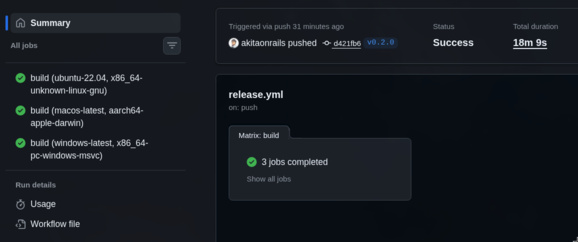
- CI (push + PR): build and test on Linux, macOS, and Windows. Each push runs
cargo test+npm teston the 3 OSes. Includescargo fmt --check,cargo clippy -- -D warnings, andcargo audit. If any platform fails, the PR doesn’t pass. - Release (tags v*): build via
tauri-action, generates AppImage (Linux), DMG (macOS arm64), MSI (Windows), and creates a Draft Release on GitHub with the binaries attached.
The 10+ CI fix commits on Monday morning were the least glamorous part of the project. Things like:
#[cfg(not(target_os = "windows"))]on imports that usestd::os::unix::fs::PermissionsExtdunce::canonicalizeinstead ofstd::fs::canonicalizebecause Windows generates paths with\\?\prefix that break string comparisons- Install
rustfmtandclippyexplicitly on the runner because they don’t always come in the default GitHub Actions toolchain - Remove the macOS Intel target from the release workflow (Apple Silicon only — not worth the cost of maintaining two Mac targets)
Nobody posts these things on X. But without them, your app doesn’t build on 2 of the 3 targets.
External Integrations
The app depends on 3 external systems. Each one brought its own problems.
Ollama
Ollama serves the vision models via local REST API (port 11434). The app does:
- Status check: checks if Ollama is running and lists installed/loaded models
- Model download: if the recommended model isn’t installed, offers download with a progress bar via API streaming
- Generation: sends image in base64 + prompt, receives JSON (with the 3-level parsing cascade)
- Cleanup: unloads models from VRAM when not classifying, so it doesn’t monopolize the GPU from the user’s other applications
Ollama is the only hard requirement. Without it, classification doesn’t work. The SetupModal guides the user through installation and model download.
Surya OCR
Surya is a Python OCR engine that runs locally. The problem: the app is Rust and can’t depend on a system Python installation. The solution:
- The app maintains an isolated Python venv at
~/.local/share/frank_sherlock/surya_venv/ - The
surya_ocr.pyscript is bundled as a Tauri resource (packaged in the binary) - On first use, the
SetupModaloffers to automatically provision the venv (finds Python, creates venv, pip install surya-ocr + dependencies) - Classification calls the script via subprocess, passes the image as argument, reads the extracted text from stdout
Surya is a soft requirement: if it’s not installed, the app works normally — it just won’t have dedicated OCR. The pipeline gracefully degrades to use Ollama Vision as fallback, which is worse in coverage but works. The user sees a warning in setup, not an error that blocks usage.
PDFium
For PDFs, I needed native text extraction and page rendering for thumbnails. PDFium is Chrome’s PDF engine, and has Rust bindings via pdfium-render.
The PDFium binary is downloaded by a script (scripts/download-pdfium.sh) and bundled via lib/ in Tauri resources. Each platform gets the correct binary (.so, .dylib, .dll). lib/ is gitignored — the binaries are downloaded at build time, not versioned.
The PDF pipeline:
- Tries to extract native text (no OCR) — many PDFs already have a text layer
- If there’s enough text, uses it directly for indexing (faster and more accurate than OCR)
- If not, renders the page and sends it to the image pipeline (Ollama Vision)
- Detects blank pages, finds the first page with real content
- Generates thumbnail as a montage of the first 2 pages with content (gives a better sense of the document than just the cover)
What Agile Vibe Coding Really Is
OK, now the point that really matters. The reason I’m writing this.
What Claude Did
- Wrote most of the Rust and TypeScript code
- Generated 166 Rust tests and 172 frontend tests
- Implemented JSON parsing with 3 fallback levels
- Set up CI/CD with 3-OS matrix
- Did massive refactors (monolith → 15 components + 10 hooks)
- Handled edge cases of encoding, Unicode paths, and exotic file formats
- Wrote SQL queries, migrations, FTS5 indexes
- Implemented GPU detection, clipboard per OS, Python resolution
- Created the setup flow with progress bar and model download
- Debugged and fixed dozens of cross-platform compilation issues
The speed is hard to describe without sounding like exaggeration. Saturday’s 19:04 commit, the one with 4,186 lines and 47 tests, took about an hour including my review. A human dev, even a good one, would take a full day to write that with the same test coverage.
What I Did
- Decided to do benchmarks before writing any app code
- Chose Tauri over Electron (smaller footprint, native Rust, no Node runtime in prod)
- Defined the read-only principle as an inviolable rule
- Designed the incremental scan with move detection via fingerprint
- Decided on cooperative cancellation with AtomicBool
- Demanded formal schema migration (no ad-hoc ALTER TABLE in loose scripts)
- Insisted on platform abstraction from the first multi-OS commit
And mainly: I asked the annoying questions. “What if the scan is canceled in the middle?” became the checkpoint system. “What if the database corrupts?” became WAL + backup + health check. “What if the person doesn’t have a good GPU?” became tier model selection. “What if Surya isn’t installed?” became a soft requirement with fallback. “What if the user deletes a root that’s in the middle of a scan?” became cancel-before-delete. “What if the file moves but the content is the same?” became move detection.
Oh, and I decided when to stop adding features and publish.
That last one is underrated. The temptation to keep adding “just one more thing” is enormous when the marginal cost of implementing is low. Claude implements any feature I ask for in minutes. But software that’s never published is useless to anyone. Knowing when to stop is a skill no LLM will give you.
The Real Pattern
Agile Vibe coding isn’t “asking the LLM to make an app”. It’s pair programming with a partner who’s stupid fast, has perfect memory, and never complains about refactoring. You say what you want, it implements, you review and adjust the direction. But if you don’t know where to go, speed doesn’t help — you just get to the wrong place faster.
The questions I asked — about resilience, cancellation, multi-OS, graceful degradation, edge case detection — none of them came from the LLM. They came from years building software that has to work in real environments, with real users, on diverse hardware. Claude isn’t going to ask you “what if the user pulls the network cable in the middle of downloading the model?”. But if you ask, it implements the handling in minutes.
It’s tempting to look at this project and conclude that anyone with a good idea could have done the same. But try to imagine: without the decision to do benchmarks, I would have picked the wrong model. Without the Python PoC, I’d have discovered JSON parsing problems in production. Without the platform abstraction, I’d be debugging Windows issues scattered across 15 files. Without the scan checkpoint, users would lose hours of processing on every crash. Without the formal schema migration, the first update would break everyone’s database.
Think of an architect with an absurdly efficient construction crew. The architect doesn’t need to lift every wall, but needs to know where they go and what happens if you take one out. The crew executes fast, works at night, doesn’t complain. But someone needed to have drawn the blueprint. Without a blueprint, it’s just a pile of bricks stacked quickly.
Final Numbers
For those who like concrete numbers:
| Metric | Value |
|---|---|
| Commits | 50 |
| Hours of effective work | ~26h |
| Lines of Rust | 8,359 |
| Lines of TypeScript | 5,842 |
| Lines of CSS | 1,649 |
| Rust tests | 166 |
| Frontend tests | 172 |
| Total tests | 338 |
| Platforms | 3 (Linux, macOS, Windows) |
| Database migrations | 5 |
| Rust modules | 13+ |
| React components | 15+ |
| React hooks | 10+ |
The first commit was Friday 02/21 at 19:29. The last was Monday 02/23 at 14:33. Discounting sleep (~8h on Saturday/Sunday night, ~8h on Sunday/Monday early morning) and breaks, that’s ~26 hours of work distributed over a weekend.
From zero — without a single file in the repository — to published binaries for 3 operating systems, with automated tests running in CI on every push. Including the research phase, which on its own would justify a sprint.
Conclusion
Agile Vibe coding works. But it works like any powerful tool: in the hands of someone who knows what they’re doing.
The idea for Frank Sherlock would fit in a tweet: “classify images with local LLM”. But turning that into real software required: benchmarked research with formal ground truth, proof of concept validating the complete pipeline, incremental architecture, error handling at 3 levels, cooperative cancellation, formal schema migration, platform abstraction, CI/CD with 3-OS matrix, integration with 3 external systems with graceful degradation, and 338 tests to ensure none of that breaks when someone runs cargo update.
The LLM sped all that up absurdly. But it didn’t replace the need to know what to do. If I had asked “make an app that classifies images” without the 2 hours of benchmarks, without the proof of concept, without the architecture decisions, without the annoying questions about edge cases, the result would be a prototype that works on my machine and breaks anywhere else. And I probably wouldn’t even notice until someone complained.
The vibe needs an experienced conductor. For now, that conductor is still human.
Code at github.com/akitaonrails/FrankSherlock. GPL-3.0, local-only, open source.